> ## Documentation Index
> Fetch the complete documentation index at: https://docs.wavebybemobi.com/llms.txt
> Use this file to discover all available pages before exploring further.
# Iframe
> How to use the web components through iframes
This guide explains how to integrate our usage monitoring components using iframes. These components provide real-time and cached consumption data visualization with a responsive design.
## Usage Summary Component
The Usage Summary component displays an overview of the customer's consumption data, including total usage, available balance, and purchase recommendations when necessary.
### Integration
```html theme={null}
```
The `externalCode` parameter represents a unique identifier for the user. In many implementations, this is the MSISDN (Mobile Station International Subscriber Directory Number) - the user's phone number in international format. However, it can be any unique identifier that your system uses to identify users.
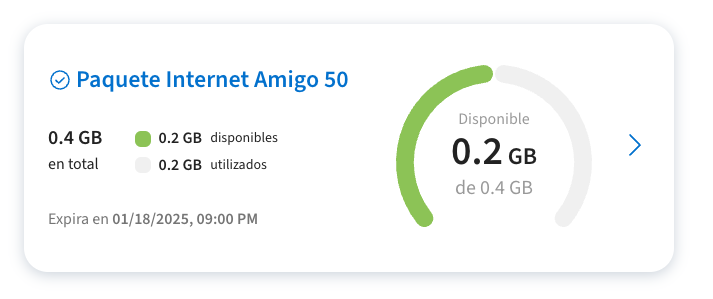 ### Empty State and Alerts
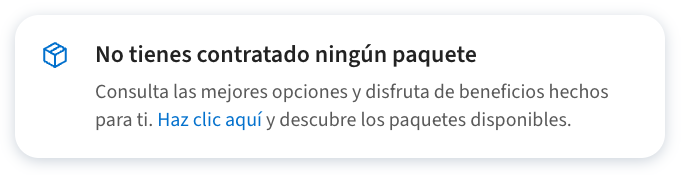
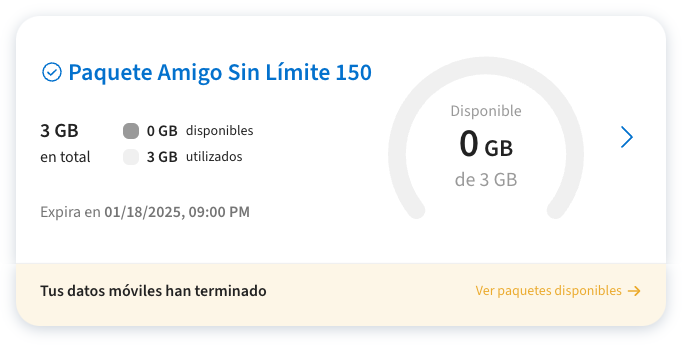
The component includes built-in states for various scenarios:
### Empty State and Alerts
The component includes built-in states for various scenarios:
 ## Usage Details Component
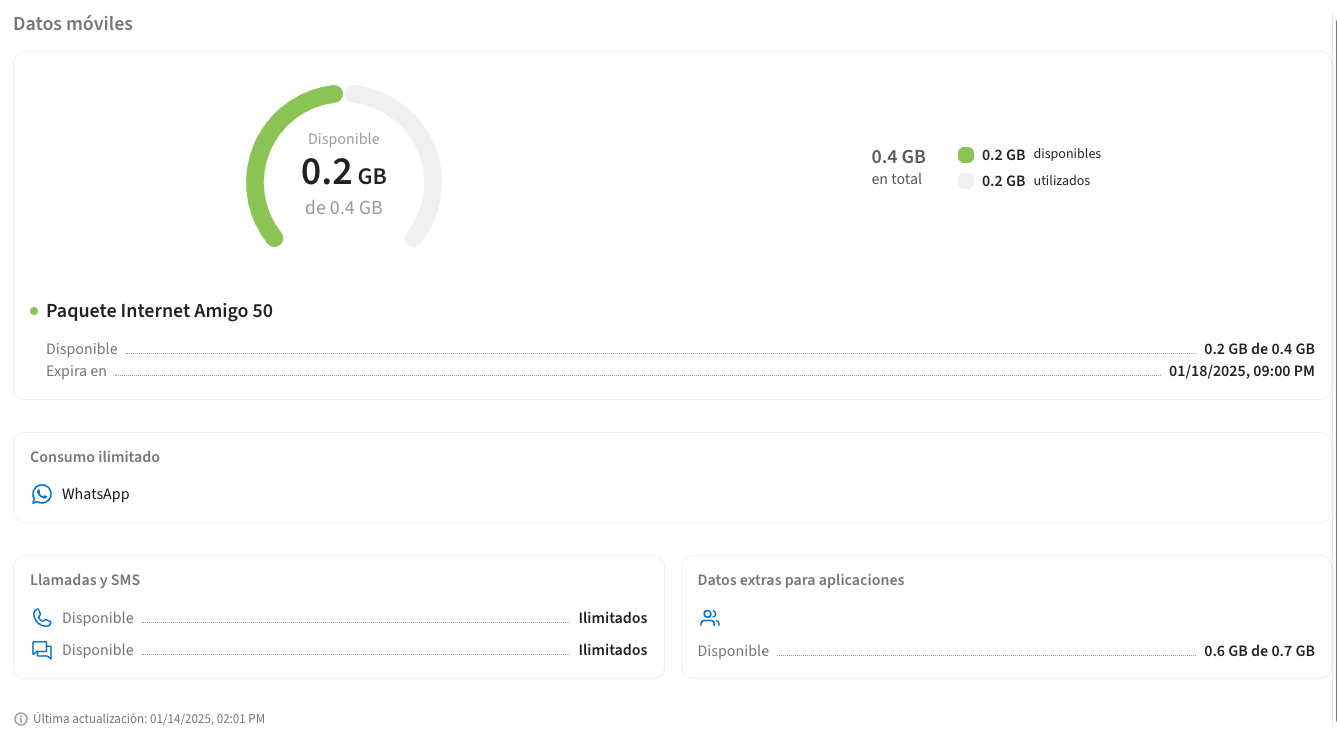
The Usage Details component provides a detailed breakdown of consumption by product and shows zero-rating/sponsored apps information.
### Integration
```html theme={null}
```
## Usage Details Component
The Usage Details component provides a detailed breakdown of consumption by product and shows zero-rating/sponsored apps information.
### Integration
```html theme={null}
```
 ### Zero Rating Apps Display
 ## Cache Management
Both components implement server-side caching for improved performance and resilience. This ensures that usage information remains available even when some external mediation services are temporarily unavailable.
### Cache Behavior
* Default: Components serve cached data when available
* Cache updates automatically in the background
* Cache invalidation follows business rules for data freshness
### Forcing Cache Bypass
To bypass the cache and fetch fresh data, add `online=true` to the URL:
```html theme={null}
```
## Customization
The components support extensive customization through the Wave API, allowing you to tailor the user experience to match your brand and requirements.
### Customizable Elements
The following elements can be customized remotely:
* **Text Content**
* Labels and headings
* Button text
* Error messages
* Information tooltips
* Success/failure messages
* **Visual Elements**
* Primary and secondary colors
* Button styles
* Card backgrounds
* Border colors
* Icon colors
* **Links and Navigation**
* CTA button destinations
* External links
* Help/support links
* Terms and conditions URLs
### Applying Customizations
Customizations are applied through the Wave API configuration. The components automatically fetch and apply these settings at runtime
## Dynamic Height Adjustment
All components emit a `postMessage` event containing the scroll height. This allows for dynamic iframe height adjustment to prevent unwanted scrollbars.
```javascript theme={null}
window.addEventListener('message', function(e) {
if (e.data && e.data.scrollHeight) {
const iframe = document.querySelector('#myIframe');
iframe.style.height = `${e.data.scrollHeight}px`;
}
});
```
The component sends height updates on:
* Initial load
* State changes
* Content updates
* Error messages display
Remember to implement the height adjustment listener for all iframe integrations to ensure proper display without scrollbars.
## Cache Management
Both components implement server-side caching for improved performance and resilience. This ensures that usage information remains available even when some external mediation services are temporarily unavailable.
### Cache Behavior
* Default: Components serve cached data when available
* Cache updates automatically in the background
* Cache invalidation follows business rules for data freshness
### Forcing Cache Bypass
To bypass the cache and fetch fresh data, add `online=true` to the URL:
```html theme={null}
```
## Customization
The components support extensive customization through the Wave API, allowing you to tailor the user experience to match your brand and requirements.
### Customizable Elements
The following elements can be customized remotely:
* **Text Content**
* Labels and headings
* Button text
* Error messages
* Information tooltips
* Success/failure messages
* **Visual Elements**
* Primary and secondary colors
* Button styles
* Card backgrounds
* Border colors
* Icon colors
* **Links and Navigation**
* CTA button destinations
* External links
* Help/support links
* Terms and conditions URLs
### Applying Customizations
Customizations are applied through the Wave API configuration. The components automatically fetch and apply these settings at runtime
## Dynamic Height Adjustment
All components emit a `postMessage` event containing the scroll height. This allows for dynamic iframe height adjustment to prevent unwanted scrollbars.
```javascript theme={null}
window.addEventListener('message', function(e) {
if (e.data && e.data.scrollHeight) {
const iframe = document.querySelector('#myIframe');
iframe.style.height = `${e.data.scrollHeight}px`;
}
});
```
The component sends height updates on:
* Initial load
* State changes
* Content updates
* Error messages display
Remember to implement the height adjustment listener for all iframe integrations to ensure proper display without scrollbars.